Why Ergonomics Matters for Trigger Points
Ergonomics for myofascial pain is not about achieving a textbook posture — it is about understanding how sustained positions may create or perpetuate trigger points, and making practical changes that reduce cumulative muscle overload throughout your day.
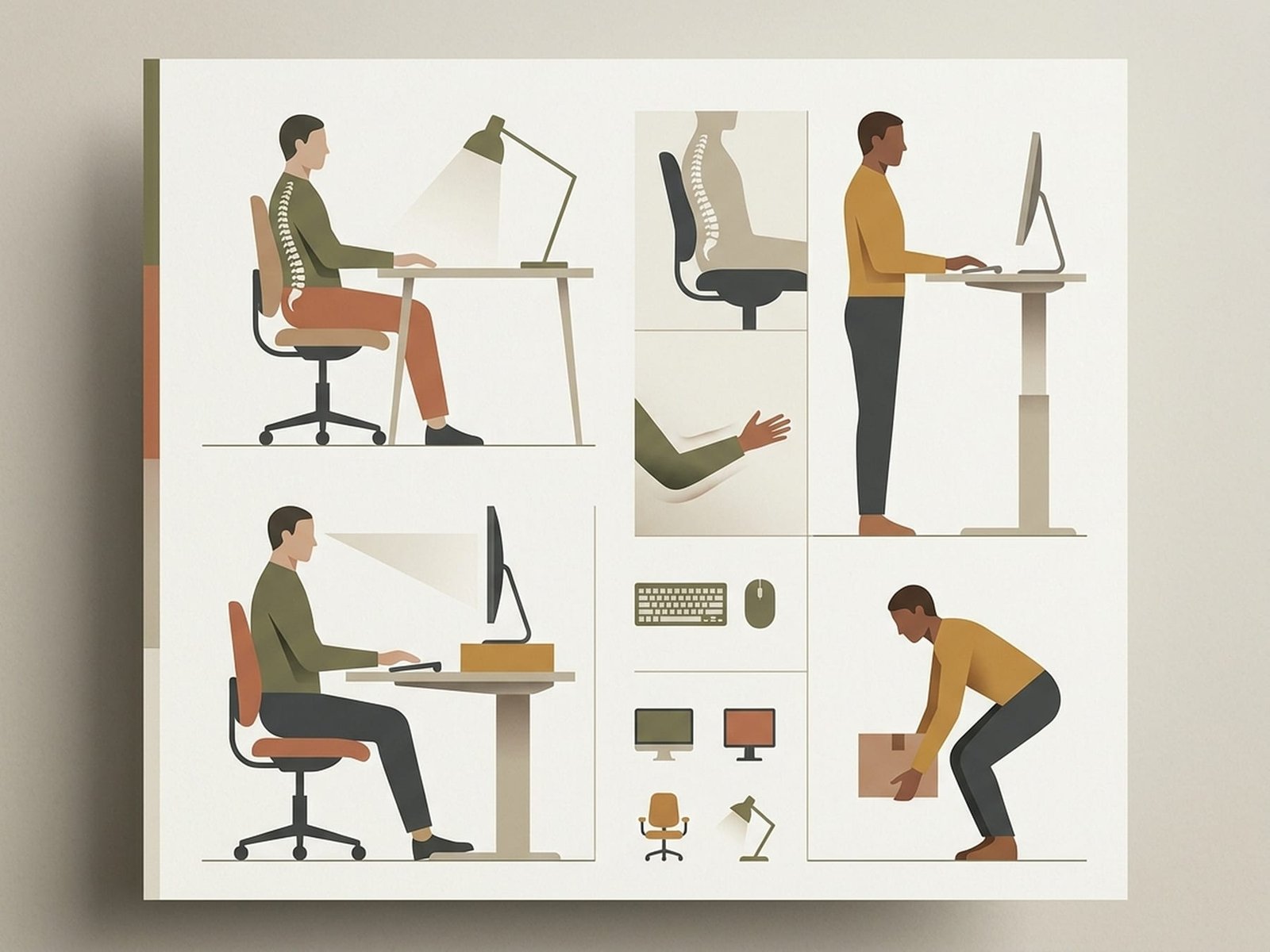
Ergonomics Guide
Visual GuideSustained Postures Increase Local Muscle Demand
When a muscle is held in one position for a long time — whether shortened or lengthened — local fatigue, reduced movement variability, and increased discomfort can develop. In susceptible patients, these sustained low-level loads may contribute to trigger point irritability or make existing trigger points harder to calm. The muscle does not need to be under heavy load; even low-force sustained contraction, such as holding the head forward toward a screen, can become problematic over time.
Shortened Muscles Can Become Irritable
Muscles held in a shortened position for long periods, such as the pectorals during hunching or the upper trapezius during sustained shrugging, may become stiff, tender, and locally painful. One proposed explanation involves reduced movement and local metabolic stress within shortened fibers. This helps explain why shoulders and neck often ache after long desk sessions even when there was no dramatic injury.
Lengthened Muscles Under Load Can Also Struggle
Conversely, muscles held in a lengthened position while still having to work — such as the rhomboids and middle trapezius in prolonged forward-head or rounded-shoulder posture — can become overloaded through sustained eccentric demand. In practice, both shortened and overstretched tissues may become symptomatic if they are asked to do the same thing for too long without variation.
It Is Not About "Perfect Posture"
Modern ergonomics has moved away from the idea that there is one perfect posture everyone should hold all day. The more useful principle is that any static posture can become irritating if maintained long enough. Variation matters more than chasing a rigid ideal. The best posture is usually your next posture.
The Movement-Break Principle
No position stays comfortable forever. For many people, changing position every 20-30 minutes is more realistic and more useful than trying to maintain one ideal setup for hours. Brief movement breaks help restore blood flow, reduce static loading, and interrupt the slow buildup of muscular fatigue that often feeds myofascial pain.
Key principle: The best posture is your next posture. No static position — however "correct" — should be maintained for very long without variation.
Desk & Office Setup
Your workstation setup shapes how much sustained load your muscles carry during long work sessions. Small adjustments to your desk, chair, monitor, and peripherals can meaningfully reduce the postural stress that keeps trigger points irritated. Each recommendation below identifies the muscle groups it most often protects.
The best posture is your next posture — no position, no matter how ergonomically sound, should be maintained for too long without variation.
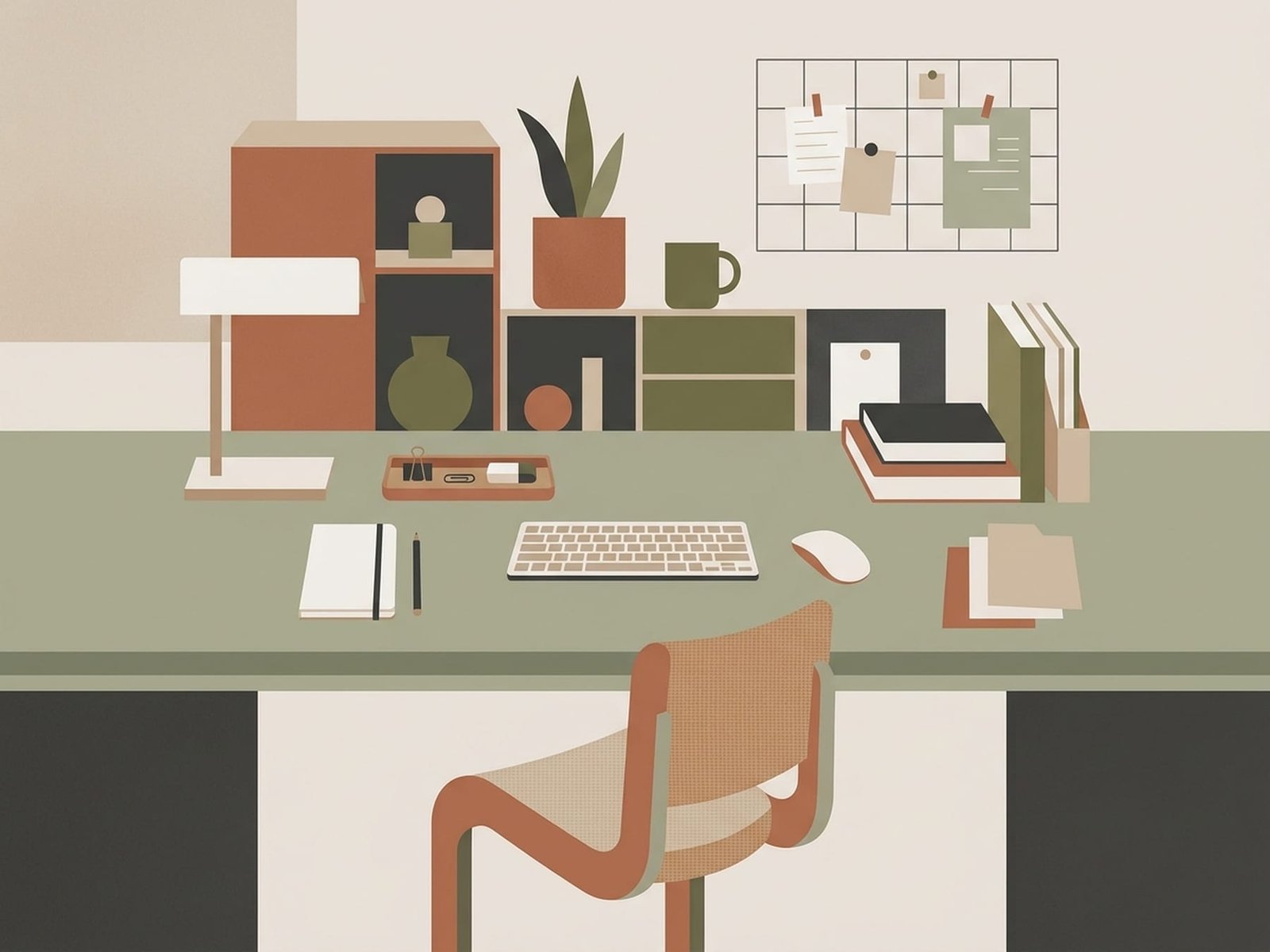
Desk & Office Setup
Equipment OverviewMonitor Position
Muscles protected: Upper trapezius, levator scapulae, suboccipitals, sternocleidomastoid (SCM)
- Top of the screen should generally be at or slightly below eye level so the gaze can angle gently downward without sustained neck flexion
- Distance: approximately one arm's length away (often around 50-70 cm / 20-28 inches, depending on screen size and vision needs)
- Screen directly in front of you, not persistently angled to either side — even mild sustained rotation can irritate the SCM and scalenes over time
- If you wear bifocals or progressive lenses, you may need the monitor slightly lower to avoid tipping the head backward
- Increase font size or display scaling rather than leaning forward to read
- Use a monitor arm, riser, or books to achieve the correct height — many desk-level monitors sit too low
Chair Setup
Muscles protected: Quadratus lumborum, piriformis, gluteals, erector spinae
- Feet flat on the floor, or on a footrest if the desk height forces the chair too high
- Knees around 90 degrees, with thighs broadly supported
- Lumbar support that helps maintain a comfortable low-back curve — a small cushion or rolled towel can work if your chair lacks built-in support
- Seat pan depth: roughly 2-3 finger widths between the front edge of the seat and the back of the knees
- Armrests adjusted so the elbows can rest near desk height — too high may encourage shrugging, too low may encourage leaning
- A slight recline is often more comfortable than rigidly sitting at 90 degrees all day
Keyboard Position
Muscles protected: Wrist flexors/extensors, forearm muscles, upper trapezius, scalenes
- Elbows at about 90 degrees or slightly more open — avoid reaching forward for the keyboard
- Wrists relatively neutral: not held in sustained extension, flexion, or side-bending
- Keyboard flat or with only a slight tilt if that feels better — many users do not benefit from steeply raising the back edge
- Shoulders relaxed rather than shrugged — if your keyboard is too high, your shoulders may elevate all day without you noticing
- Consider a split or ergonomic keyboard if forearm or wrist symptoms are persistent
- A keyboard tray can help when the desk is too high for your body proportions
Mouse Use
Muscles protected: Wrist extensors, forearm muscles, infraspinatus, upper trapezius
- Position the mouse as close to the keyboard as possible to reduce shoulder reach
- Use your arm and shoulder, not only your wrist, to move the mouse during longer tasks
- Mouse at the same general height as the keyboard
- Keep the wrist straight and avoid resting it hard on the desk edge
- Consider a vertical mouse if forearm pain, pronation strain, or wrist extensor symptoms are persistent
- Alternate hands for simple tasks when practical, even if only occasionally
Dual Monitor Setup
Muscles protected: Sternocleidomastoid (SCM), scalenes, upper trapezius, levator scapulae
- If you use one monitor primarily, center that one directly in front of you and angle the secondary monitor toward you
- If you use both monitors equally, position them in a slight V-shape with the inner edges close together and centered to your midline
- Both monitors should ideally be at similar height
- The goal is to reduce prolonged neck rotation, not eliminate every small head movement
Standing Desk
Muscles protected: Quadratus lumborum, gluteals, calves, plantar intrinsics
- Alternate between sitting and standing rather than standing for the whole day
- Use an anti-fatigue mat if prolonged standing is part of your setup
- Maintain the same monitor, keyboard, and mouse principles described above
- Shift your weight, change stance, and use a low footrest periodically
- Wear supportive footwear if you stand on a hard floor for long periods
- If the low back, hips, or calves start to fatigue, it is usually time to change position rather than push through
Quick Desk Check
Take 30 seconds right now: Are your feet supported? Knees around 90 degrees? Monitor near eye level? Shoulders relaxed? Elbows near desk height? If any of these are off, adjust them. Small changes compound over thousands of hours of work.
Phone & Tablet Use
Many people spend hours each day looking at phones and tablets. This "tech neck" pattern has become a major contributor to cervical trigger points, headaches, and upper-back pain. The more the head drops forward, the more work the posterior neck muscles have to do.
Cervical Load by Forward Head Angle
How neck muscle demand rises as the head tilts forward
Adapted from Hansraj (2014) biomechanical modeling of cervical spine loads
Muscles Affected by "Tech Neck"
These muscle groups often bear the brunt of sustained forward-head posture and are common sites of trigger points in heavy smartphone and tablet users.
Hold Your Phone Higher
Raise your device closer to eye level whenever possible. Using both hands and bending the elbows to bring the phone upward is usually less stressful on the neck than dropping the head toward the device. A phone stand on a table is even better for prolonged use.
Use a Tablet Stand
Avoid keeping a tablet flat in your lap for long sessions. The resulting neck flexion can substantially increase cervical muscle demand. A stand that holds the screen higher is one of the simplest ways to reduce "tech neck" strain.
Voice-to-Text Instead of Typing
Prolonged thumb typing loads the forearm muscles, wrist stabilizers, and thumb musculature repetitively. Voice dictation is often a practical way to reduce hand, wrist, and forearm strain during longer messages or notes.
Set Time Limits
Use your phone’s screen-time or reminder tools to prompt breaks after 20-30 minutes of continuous use. A brief reset — look up, roll the shoulders, and gently retract the chin — is often enough to interrupt the buildup of neck and upper-quarter strain.
Alternate Hands and Ears
If you hold your phone to one ear regularly, switch sides. Sustained unilateral neck side-bending can be a strong perpetuating factor for upper trapezius and levator scapulae symptoms. Speakerphone or earbuds are often better choices.
Driving Ergonomics
For commuters and frequent drivers, the car is often an overlooked source of symptom perpetuation. The combination of seated posture, steering-wheel grip, pedal reach, and vehicle vibration can create a uniquely aggravating environment for multiple muscle groups.
Seat Position
Muscles affected: Hip flexors, quadratus lumborum, hamstrings
Adjust the seat so you can fully depress the pedals without having to lock the leg straight. A slight bend in the knee when the pedal is fully depressed is usually more comfortable. Sitting too far back encourages reaching; sitting too close can cramp the hips and knees.
Lumbar Support
Muscles affected: Erector spinae, quadratus lumborum, multifidi
Many car seats do not provide ideal lumbar support for long drives. A lumbar roll, rolled towel, or small cushion positioned at the low back can improve comfort and reduce slumping. Without support, the lower back often flattens into the seat and the paraspinals may work harder over time.
Steering Wheel: 9-and-3 Often Works Better
Muscles affected: Upper trapezius, deltoids, infraspinatus
For many drivers, the 9-and-3 hand position is more comfortable than the older 10-and-2 position because it usually reduces sustained shoulder elevation. The best position is one that allows the shoulders to stay relaxed and the elbows slightly bent.
Mirror Adjustment
Muscles affected: Sternocleidomastoid, scalenes, upper trapezius
Adjust all mirrors while sitting in your intended driving posture. If you later find yourself leaning or craning to see them, that can serve as a useful reminder that your posture has drifted.
Seat Heaters for Muscle Comfort
Muscles affected: Gluteals, piriformis, erector spinae, QL
If your vehicle has heated seats, gentle warmth can improve comfort during longer drives, especially in cold weather when muscles tend to feel stiffer. Use it as a comfort tool, not as a substitute for breaks and position changes.
Stop Every 1-2 Hours
Muscles affected: All postural muscles — hip flexors, QL, piriformis, upper trapezius
On drives longer than about an hour, it often helps to stop, get out, and walk for a few minutes. Gentle hip flexor stretches, shoulder rolls, and position changes are usually more helpful than sitting continuously until symptoms escalate.
Long-drive rule: On drives longer than about one hour, it often helps to stop, get out, walk briefly, and perform a few simple resets. One long uninterrupted driving block usually loads tissues more than most people realize.
Sleep Positions
You spend roughly one-third of your life in your sleep position. Those hours can support recovery, or they can continue to reload irritated tissues if your sleep posture places sustained strain or compression on already sensitive muscles.
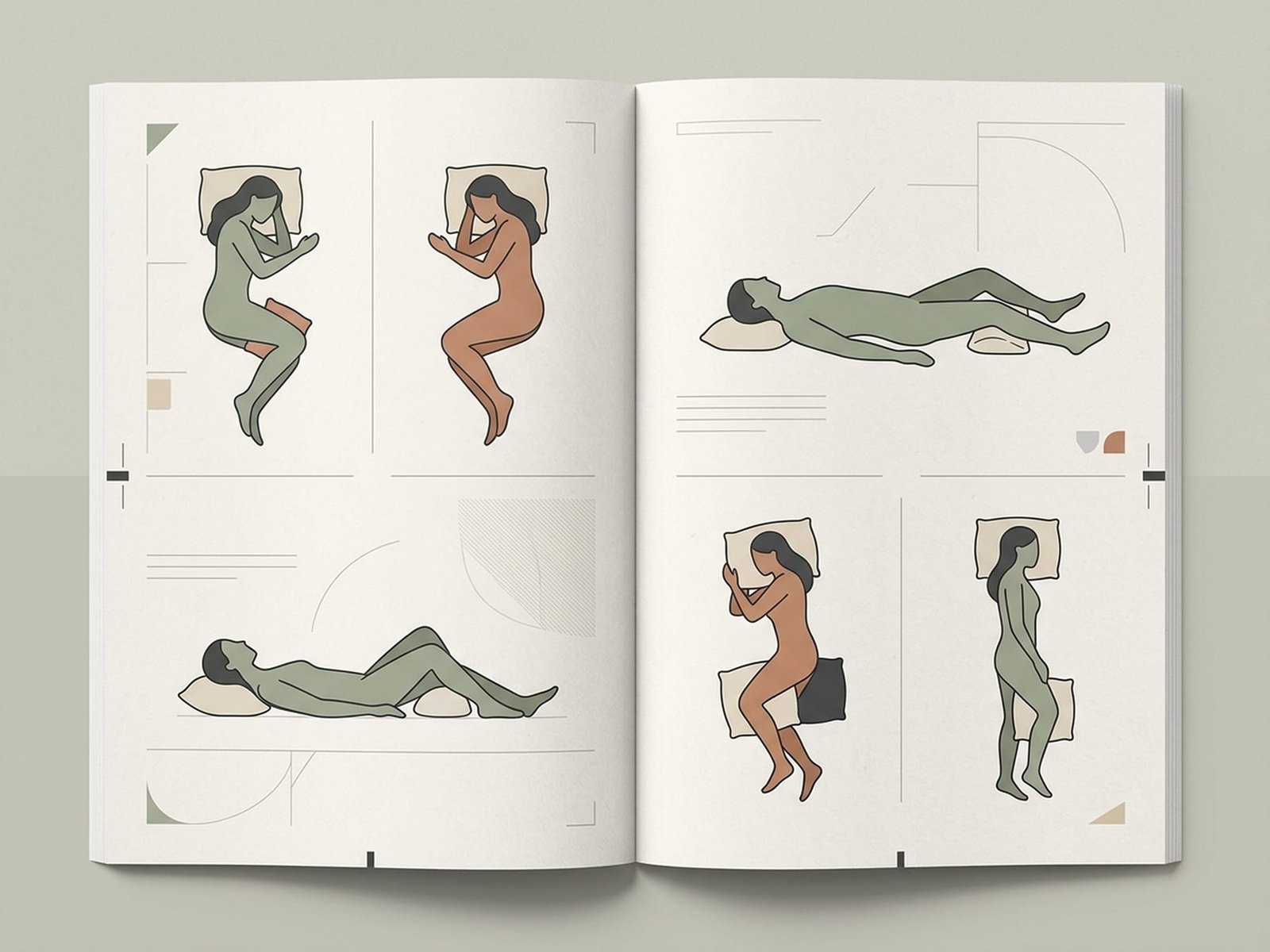
Sleep Positions
Form and Position GuideSide Sleeping (Recommended)
Best for many trigger point patients- Place a firm pillow between the knees to help keep the hips, pelvis, and spine aligned
- Pillow height should approximately match the distance from the shoulder to the side of the head
- Hug a body pillow or place a pillow in front of the chest to reduce forward shoulder rolling
- Avoid an exaggerated fetal position with the knees pulled tightly to the chest if that worsens hip or low-back tightness
- Alternate sides through the night if possible to reduce sustained compression on one shoulder
Muscles affected: Upper trapezius, levator scapulae, QL, piriformis, gluteus medius, hip flexors
Back Sleeping
Good with proper support- Place a thin pillow or bolster under the knees to reduce tension in the lower back and hip flexors
- Use a contour pillow or a pillow that supports the cervical curve without pushing the head forward
- Keep the arms at the sides or resting comfortably on the abdomen if overhead positions aggravate symptoms
- If snoring or sleep apnea is an issue, consider slightly elevating the head of the bed or using a wedge rather than stacking multiple pillows
- The pillow should fill the space behind the head and neck comfortably, not force the head into flexion
Muscles affected: Cervical extensors, suboccipitals, lumbar erector spinae, hip flexors
Stomach Sleeping (Least Recommended)
Often aggravating — avoid if possible- Stomach sleeping often forces the head into sustained cervical rotation for hours and may also increase lumbar extension
- If you cannot change immediately, use a very thin pillow or no pillow under the head to reduce extra cervical extension
- A thin pillow under the pelvis may help reduce lumbar extension in some people
- Try transitioning gradually to a three-quarter prone or side-supported position with a body pillow
- Specialty pillows may reduce rotation somewhat, but stomach sleeping is still often a poor long-term fit for neck-dominant trigger point patterns
Muscles affected: Sternocleidomastoid, scalenes, suboccipitals, cervical rotators, lumbar erectors, quadratus lumborum
Pillow Selection Guide
Side Sleepers
Type: Firm, thicker pillow
Material: Buckwheat hull, latex, or higher-loft memory foam
Usually needs to fill the gap between the shoulder and head to keep the cervical spine relatively neutral through the night.
Back Sleepers
Type: Medium firmness, contour shape often helpful
Material: Contour memory foam or latex with cervical support
Should support the cervical curve without pushing the head too far forward.
Stomach Sleepers
Type: Very thin or flat
Material: Down alternative or soft poly-fill
A thick pillow often worsens cervical extension and rotation in an already compromised position.
Mattress Firmness for myofascial pain
Medium-firm mattresses often work well for many myofascial pain patients. A mattress that is too soft may allow the body to sink and lose alignment, while one that is too firm may create pressure points. Replace sagging mattresses when support has clearly deteriorated — they are a commonly overlooked perpetuating factor for trunk and lower-back discomfort.
Movement Breaks
Micro-breaks are one of the most useful daily tools against trigger point aggravation. Even 30-60 seconds of movement every 20-30 minutes can reduce the muscle overload that comes from static postures. One long stretch break rarely compensates for hours of uninterrupted immobility.
The 20-20-20 Rule (Extended for myofascial pain)
Originally designed for eye strain prevention, this rule adapts well for trigger point management:
20
minutes
Set a timer for every 20 minutes of seated work
20
seconds
Look at something 20 feet away for 20 seconds (eyes)
20
seconds
Stand, stretch, or change position briefly (body)
5 Desk Stretches You Can Do in 60 Seconds
Chin Tucks
10 seconds × 5 repsSit tall. Gently pull your chin straight back without tipping the head up or down. Hold briefly. This helps counter forward-head posture and may activate the deep cervical flexors.
Targets: Suboccipitals, deep cervical flexors, sternocleidomastoid
Shoulder Rolls
10 forward, 10 backwardSlowly roll your shoulders in full circles — up, back, down, and forward. Reverse after 10 repetitions. The backward phase helps offset the sustained rounded-shoulder position many desk workers drift into.
Targets: Upper trapezius, levator scapulae, rhomboids, pectorals
Doorway Chest Stretch
30 seconds each sideStand in a doorway with your forearm on the frame at about 90 degrees. Step forward gently until you feel a stretch across the chest. Repeat at different arm heights if needed.
Targets: Pectoralis major and minor, anterior deltoid, biceps
Seated Spinal Twist
20 seconds each sideSitting in your chair, cross one leg over the other. Place the opposite hand on the outside of the crossed knee. Gently rotate your torso toward the crossed knee, keeping the spine tall.
Targets: Thoracic rotators, obliques, QL, erector spinae
Wrist Circles & Extensions
10 circles each direction, then 15-second holdMake slow, full circles with your wrists in both directions. Then extend one arm forward, palm up, and gently pull the fingers back with the other hand for 15 seconds. Repeat palm down.
Targets: Wrist flexors, wrist extensors, forearm pronators/supinators
Walking Meetings
For phone calls and one-on-one meetings, walking instead of sitting can be surprisingly helpful. Even slow walking changes joint angles, activates postural muscles dynamically, and interrupts the sustained load pattern of desk work.
Set a Timer
Your body often adapts to sustained postures and stops warning you early. A timer helps because you cannot rely on pain alone as a good guide. Set a recurring alarm and move when it goes off.
Bag & Carrying Habits
How you carry things through the day is an often-overlooked contributor to trigger points. Bags, groceries, and children create asymmetric loading that can overload the upper trapezius, levator scapulae, thoracic musculature, and trunk stabilizers.
Backpack (Two Straps)
BestPros
- Distributes weight more evenly across both shoulders
- Keeps the load closer to the center of gravity
- Usually less likely to create marked asymmetrical muscle loading
Cons
- Must actually be worn on both shoulders to provide these advantages
- Heavy loads can still compress the upper trapezius bilaterally
Tip: Keep the load to roughly 10-15% of body weight or less when possible. Use both hip and chest straps if available. Tighten straps so the bag sits relatively high on the back rather than sagging.
Crossbody Bag
ModeratePros
- Often better than a purse because the load crosses the trunk
- Hands-free carrying
Cons
- Still creates asymmetrical loading
- The strap may compress one upper trapezius
- Some people compensate by side-bending the trunk
Tip: Alternate sides regularly. Keep the bag light. Position the strap across the trunk rather than directly on the upper trapezius whenever possible.
Purse / Shoulder Bag
WorstPros
- Convenient and accessible
Cons
- Concentrates the load on one side
- Often encourages unconscious shoulder elevation to stop the strap from slipping
- Sustained unilateral carrying can aggravate neck and shoulder symptoms
Tip: Switch to a backpack or crossbody bag if you carry more than a very light load. If you must use a purse, switch shoulders frequently and keep it as light as possible.
Weight Limits for Backpacks
A practical rule is to keep backpack load to roughly 10-15% of body weight when possible. Heavier loads increase compression through the upper trapezius and often encourage a forward lean. Use both straps, and the hip or chest straps if available. Pack heavier items closer to your back.
Grocery Carrying Technique
Distribute weight between both hands when possible. Carry bags at your sides rather than hiking one shoulder to stop a strap from slipping. A rolling cart or backpack is often a better option for heavier loads.
Child Carrying Ergonomics
One-hip carrying is very demanding on the QL, obliques, and contralateral hip abductors. Alternate sides frequently. Structured carriers that distribute weight through the hips are often much easier on the body than unsupported one-arm carrying.
Common Ergonomic Mistakes
Good intentions with poor execution can create new problems. These are common mistakes patients make when trying to improve ergonomics — and what tends to work better instead.
"Sit Up Straight" Is Too Vague
The Problem
Telling someone to "sit up straight" often produces an exaggerated, rigid posture that is tiring to maintain and may increase muscular effort through the erector spinae and upper trapezius. After fatigue sets in, many people collapse into an even worse posture than before.
Better Approach
Focus on supported relaxation instead: use lumbar support, let the backrest help you, and keep the shoulders relaxed rather than pulled back aggressively. A supported, slightly reclined posture is often more sustainable than rigid upright sitting.
Standing Desks Used Wrong
The Problem
Some people switch to a standing desk and then stand almost motionless for hours. Standing still is not automatically healthier than sitting still — it often just shifts the load to the calves, QL, hip stabilizers, and feet.
Better Approach
Use a standing desk to alternate positions. Stand for a while, then sit, then move. Shift weight, use a footrest, and avoid treating standing as a static posture you must "endure."
Over-Correcting Posture
The Problem
Some patients become so focused on "perfect posture" that they create new discomfort by over-correcting. Aggressively pulling the shoulders back, forcefully tucking the chin, or over-arching the lower back can all create unnecessary muscular strain.
Better Approach
Neutral is the goal, not rigid perfection. Your spine has natural curves. Support them comfortably rather than forcing them. If holding the position feels effortful or tense, it is probably too extreme.
Expensive Chairs Without Proper Adjustment
The Problem
A premium chair is not protective if it is set up badly. Seat height, lumbar position, armrest height, and seat depth usually matter more than brand or price alone.
Better Approach
Spend time adjusting whatever chair you have: feet supported, knees near 90 degrees, lumbar support at the low back, armrests near desk height, and seat depth leaving space behind the knees. A well-adjusted basic chair often outperforms a poorly adjusted expensive one.
Not Changing Position Frequently
The Problem
This is one of the most common ergonomic failures. Even a well-designed workstation will aggravate symptoms if you sit or stand in the same position for hours without interruption.
Better Approach
Set a recurring timer. When it goes off, do something different for 30-60 seconds: stand, sit, stretch, walk, adjust the chair angle, or shift weight. The specific movement matters less than breaking the static pattern consistently.
Continue Learning
Ergonomic improvements work best when combined with active self-care, targeted exercise, and optimized sleep. Explore these related guides to build a broader approach to managing myofascial pain.
Self-Care Techniques
Learn foam rolling, self-massage, heat/cold therapy, and stretching techniques to complement your ergonomic improvements.
Exercise Guide
Structured exercise programs for strengthening the postural muscles that support more comfortable movement throughout the day.
Sleep Optimization
Comprehensive guide to improving sleep quality — the critical recovery period when your muscles repair from daily postural stress.
Home Protocol
Step-by-step daily treatment protocols you can perform at home, including ergonomic adjustments integrated into your routine.
What Is Myofascial Pain Syndrome?
Understand the underlying condition and how postural factors may help create or perpetuate trigger points.
Remember: Small, Consistent Changes Win
You do not need to overhaul your entire life overnight. Start with the one or two changes most relevant to your trigger point pattern. If you have neck and shoulder pain, start with monitor height and phone habits. If you have low-back and hip pain, start with chair setup and driving position.
Set a recurring timer today. That single action — breaking the pattern of sustained static posture — may do more for your trigger points than buying expensive equipment.
The positions you hold for hours every day can be part of the problem or part of the solution. With the adjustments in this guide, you can shift the balance toward recovery.